Less paperwork. More music.
Recital runs your lessons, families, teachers and tuition in one simple place, and gives your families an app with your school's name, logo and web address on it.
- No card needed
- $20 a month, everything included
- Cancel anytime
You started a music school to teach, not to do admin.
Recital takes the busywork off your plate, so your evenings are yours again.
Book a student's weekly lesson once. Recital fills in every week after it.
Bills go out on their own each month, and families can pay by card or turn on autopay.
One conversation per family, plus announcements to the whole school.
Teachers assign it after the lesson. Families see it on their phone and tick it off.
Families see your school, not ours.
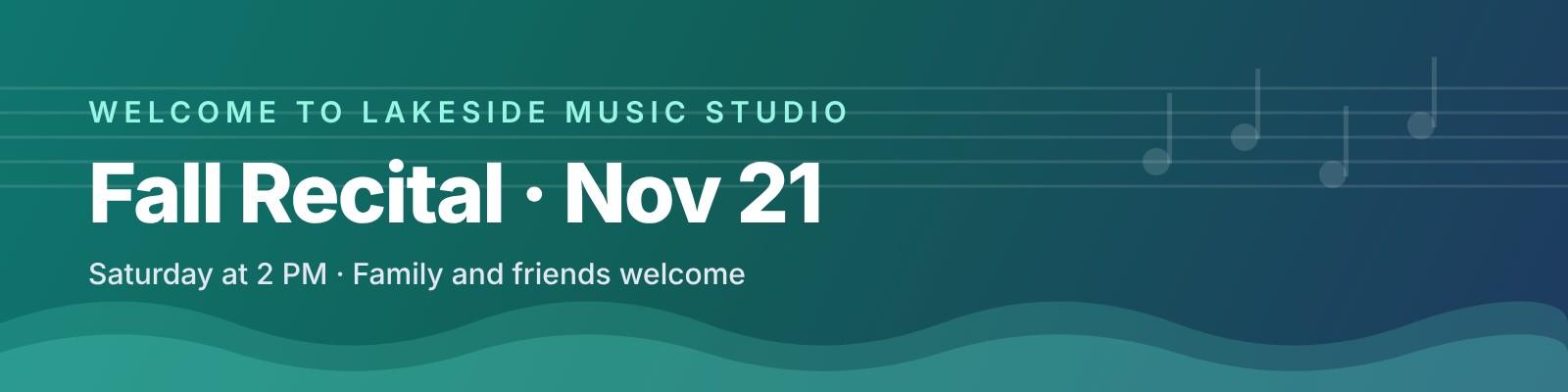
Here's our example school, Lakeside Music Studio. Every school gets its own family sign-in page at an address like recitalmusic.com/lakeside. Add your logo, a banner and your color in a minute, and the sign-in page, family app and payment pages all wear them.

Your own web address
Share recitalmusic.com/your-school on your website, flyers and emails. Families sign in right there.
Your logo
On every screen, on payment pages, and as the app icon when families add it to their iPhone.
Your banner
Put your recital date, summer camp or a warm welcome at the top of the family app.
Your color
Pick one color and the buttons and headers follow it. Recital stays a small “Powered by” line.
A schedule that fills itself.
Set each student's weekly lesson once and Recital books it every week. Move a lesson by dragging it, see every teacher at a glance, and let cancellations turn into make-up credits by your own rules.
- Weekly lessons booked for you
- A warning before you double-book a teacher or student
- Families cancel and book make-ups themselves, by your rules
- Lessons sync to Google, Apple or Outlook calendars
Get paid on time, without the awkward texts.
Pick a billing day and Recital sends every family's bill each month: monthly tuition, or the lessons they booked. Want online payments? Connect Stripe and families pay by card or turn on autopay, with the money going straight to your bank. Prefer cash or checks? Skip Stripe and mark bills paid as they come in.
- Stripe for card payments is optional
- Recital never takes a cut of your tuition
- Balances and overdue families on your Today screen
- Late-cancel fees applied by your policy
Your teachers get their own login.
Each teacher sees only their own schedule and students. They mark attendance and leave lesson notes and homework from their phone, and never see money or your settings. Come payday, Recital has already worked out what each one is owed.
- Free for every teacher
- Notes and homework go straight to families
- Teacher pay by the lesson, the hour or a share of tuition
- You can remove access anytime
An app your families will actually use, with your name on it.
Parents get lessons, homework, messages and payments in one place on their phone, in your school's look from the moment they sign in.
- Upcoming lessons and lesson notes
- Cancel a lesson and book a make-up themselves
- Homework they can tick off as they practice
- Messages with the school
- Tuition paid by card or autopay, if you use Stripe
- Opens from their home screen, no app store needed
- Signs in at your school's own web address
Everything a music school runs on
Built around how lessons actually work: weekly slots, cancellations, make-ups, practice and the parents in between.
A Today screen
Attendance to mark, make-up requests, overdue balances and unanswered messages, each one tap from done.
Families and students
Every family, student, instrument and teacher in one place. Bring them all in at once from a spreadsheet.
Your policies, applied for you
Late cancels charge the lesson, early cancels earn a make-up credit, and credits expire when you say.
Messages and announcements
Templates for the things you say every week, and one message to every family when it snows.
Homework and progress
Lesson notes and homework after every lesson, so parents know what to practice.
Money at a glance
Invoices, balances, what's been collected this month and the bills your school pays.
Teacher pay, worked out
Set each teacher's rate per lesson, per hour or as a share of tuition, and see what they're owed for any pay period.
An online sign-up form
Put the link on your website. New families fill in their details and agree to your policies, and you add them with one tap.
Calendar sync
You, your teachers and your families can add lessons to Google, Apple or Outlook calendars, and changes show up there on their own.
One simple price. Everything included.
No tiers to compare, no sales call, no surprises on your bill.
- No per-student or per-teacher fees
- No setup fee and no contract
- No cut of your tuition, ever
- Unlimited students, families and teachers
- Scheduling, weekly lessons and make-ups
- Teacher logins
- Family app with your logo, banner and color
- Your school's own sign-in web address
- Messages, homework and lesson notes
- Automatic monthly bills
- Optional card payments and autopay through Stripe
- Teacher pay, sign-up form and calendar sync
No card needed to start.
“I built Recital because the music school software out there felt like it was made for accountants. Recital is made to be simple enough that you, your teachers and your families can use it on day one, without a training video.”
Questions
What happens after the free trial?
Subscribe for $20 a month to keep going. If you don't, your information stays put and comes right back when you subscribe. We never ask for a card to start.
Is there a limit on students or teachers?
No. One price covers your whole school: every student, family and teacher.
Can I bring my students over from my old software?
Yes. Export your students to Excel or CSV from My Music Staff, TutorBird or wherever they live now, and import the file on the Families page. You see a preview before anything is saved, and anyone already in Recital is skipped.
Do families have to download an app?
No app store needed. Families open a link, sign in, and add it to their phone's home screen. It opens full screen like any other app, and on iPhone your school's logo is the icon.
Does my school get its own web address?
Yes. Every school gets a family sign-in page like recitalmusic.com/your-school, with your logo, banner and color. Put it on your website or flyers, and change it anytime in Settings.
How do tuition payments work?
It's up to you. Recital makes your bills either way, by hand or automatically each month. If you'd like families to pay by card, connect a Stripe account in a few minutes: families pay from a link or the family app, can turn on autopay, and the money goes straight to your bank. Recital takes no cut; only Stripe's standard card fee applies.
Do I need a Stripe account?
No. Stripe is only needed if you want families to pay by card online. Without it, you still send bills from Recital and mark cash or check payments as paid when they come in. You can connect Stripe later at any time.
Can my teachers log in?
Yes, at no extra cost. Each teacher sees only their own schedule and students. They can mark attendance and leave notes and homework, but can't see money or your settings.
Is my school's information private?
Yes. Each school has its own separate space, and every record is locked to the people in that school.
Can I cancel anytime?
Yes. Cancel from the billing page and you keep access until the end of the month you've paid for. No contracts.
Still have a question? Email us at hello@recitalmusic.com.
Give your school a calmer week.
Try everything free for 60 days. Set up your school tonight and invite your first family tomorrow.
Start your free trialNo card needed. Your school's information stays private.